

Modern gaming rigs and professional workstations generate substantial heat that demands aggressive cooling. When standard cooling solutions ramp up under heavy computational loads, fan turbulence and component whine can quickly ruin your quiet room environment. Choosing the right chassis ensures that acoustic dampening traps internal vibrations without choking vital airflow.
We analyzed 5 top computer chassis in September 2026 from premier hardware manufacturers like Phanteks, be quiet!, Fractal Design and more to find options that successfully eliminate unwanted noise. If you want to optimize your entire workspace for peaceful productivity, explore our ideas in Home & Living. Modern chassis designs use advanced engineering to balance airflow with thick dampening mats.
Many system builders make the critical mistake of buying high-airflow open mesh frames that leak every decibel of coil whine directly to their ears. Others buy completely sealed boxes that force cooling fans to spin at maximum velocity, defeating the purpose of a quiet build. This guide highlights the hardware solutions that deliver genuine silence through smarter internal dynamics.




How to Choose the Best PC Cases for Silent Builds in 2026
Sound Dampening Foam and Insulation Materials
Acoustic insulation represents the primary defense against internal computer component noise. Premium quiet enclosures line their steel side, front, and top panels with dense bitumen mats or thick open-cell polyurethane foam. These materials absorb high-frequency sounds like coil whine from graphics cards and the gentle hiss of rushing air.
When comparing acoustic materials, thickness and density determine how effectively a panel stops vibrations. Heavy bitumen sheets add physical mass to steel sheets, which prevents metal resonance from turning the entire computer case into a sounding board. Open-cell foam works better for trapping airborne sound waves before they escape through ventilation seams.
A practical rule of thumb is to look for multi-layered panel construction that pairs heavy mass with sound-absorbing foam. Solid panels with pre-applied insulation will always block more decibels than decorative clear acrylic or unlined aluminum. Make sure the dampening material covers the front bezel and both side doors for comprehensive coverage.
Fan Diameter and Low-RPM Acoustic Profiles
Fan size directly dictates the acoustic signature of your cooling setup. Larger fans, such as 140mm units, move more cubic feet of air per minute at significantly lower rotational speeds than standard 120mm fans. Lower rotational speeds eliminate high-pitched motor whine and reduce turbulent air shearing.
Check the included fan specifications for fluid dynamic bearings or rifle bearings rather than cheap sleeve bearings. Premium bearings run with negligible mechanical friction and do not develop annoying rattling noises over years of continuous operation. Pulse width modulation support is also essential because it lets your motherboard fine-tune fan speeds down to silent idle levels.
To calculate your acoustic target, aim for system fans that deliver sufficient airflow while staying below 900 RPM under typical workloads. Running three 140mm intake fans at 700 RPM produces far less perceptible noise than running two 120mm fans at 1300 RPM. Prioritize chassis layouts that provide native mounting brackets for larger fan frames.
Baffled Air Intakes and Sound Deflection Geometry
Direct line-of-sight sound transmission makes open-front computer cases exceptionally loud. Baffled intakes solve this problem by forcing sound waves to bounce off acoustic padding before exiting the chassis frame. Sound waves lose kinetic energy with every angled reflection, dampening the audible output before it reaches your ears.
Examine the front panel ventilation openings to see how air enters the enclosure. Side-facing intake vents with sound-absorbing channels provide excellent airflow intake while blocking direct acoustic escape routes. Premium models often incorporate curved intake channels engineered to minimize air resistance while trapping fan turbulence internally.
A smart guideline is to verify that the intake channel surface area equals or exceeds the total surface area of your intake fans. Constricted intake slits create vacuum pressure that forces fans to struggle, generating whistling sounds. Generous side slits with sound-deadening angles offer the ideal compromise for whisper-quiet thermal balance.
Vibration Decoupling for Mechanical Components
Mechanical vibrations can easily transfer into the chassis frame and create a persistent low-frequency hum. Power supplies, mechanical hard disk drives, and high-speed water pumps are the most frequent culprits of frame resonance. Decoupling mechanisms isolate these vibrating motors using soft rubber or silicone dampeners.
Look for computer cases that feature rubberized mounting pads for the power supply unit and silicone grommets inside hard drive cages. Advanced silent cases also isolate the motherboard tray and fan mounting brackets with specialized anti-vibration standoffs. You can read about maintaining comfortable, quiet environments on our Furniture & Comfort resource hub.
When installing components, never tighten hard drive or fan screws so firmly that you completely compress the silicone dampeners. Leaving slight elasticity in the rubber allows the material to absorb mechanical pulses rather than transmitting them into the metal chassis. A properly decoupled build remains completely free of rhythmic buzzing noises.
Acoustic Comparison of Chassis Design Elements
Choosing between different panel materials and intake structures involves distinct trade-offs between thermal efficiency and sound suppression. The table below outlines how common chassis features impact overall system acoustics.
| Chassis Feature | Noise Reduction Level | Thermal Impact | Primary Benefit |
|---|---|---|---|
| Dense Foam-Lined Steel Panels | Maximum | Moderate Warmth | Absorbs coil whine and high-frequency fan hiss |
| Tempered Glass Side Window | Moderate | Neutral | Allows visual monitoring but reflects sound internally |
| Baffled Side Intake Vents | High | Slight Restriction | Blocks direct line-of-sight fan noise transmission |
| Interchangeable Mesh/Solid Covers | Customizable | User Adjustable | Lets builders switch between silence and high airflow |
| Silicone Decoupled Drive Bays | High | None | Eliminates low-frequency resonance and hard drive rattle |
Solid Side Panels vs Tempered Glass Windows
Tempered glass has become standard across the computer hardware industry, but it alters acoustic performance in subtle ways. Heavy tempered glass reflects sound waves back into the computer enclosure rather than absorbing them. Solid steel panels backed by dense bitumen mats actively deaden those sound waves upon contact.
Glass panels provide great structural rigidity and block high-frequency noise better than thin, unlined aluminum sheets. However, glass cannot be lined with acoustic foam without ruining the aesthetic view of your interior components. If your graphics card suffers from severe electrical coil whine, a sound-insulated solid steel panel will conceal that high-pitched screech far better.
Consider your priority between aesthetic display and acoustic stealth before making a purchase. If the computer sits right next to your ears on a desk, choose dual solid panels with full insulation mats. If the tower sits under your desk or you run quieter low-wattage components, a tempered glass side panel provides acceptable acoustic dampening.
Internal Component Clearance and Turbulence Management
Cramped chassis interiors create turbulent air pockets that increase noise levels. When air encounters sharp metal edges, bundled cables, or tight drive cages, it generates aerodynamic drag that creates audible whooshing sounds. Generous internal clearance lets air travel smoothly across warm heatsinks and exit cleanly.
Examine the space behind the motherboard tray and look for dedicated cable routing channels with velcro ties. Modern chassis supporting rear-connector motherboards hide all wiring on the backside, leaving the main hardware chamber completely unobstructed. Smooth internal airflow pathways allow your fans to operate at lower power levels while maintaining excellent thermal margins.
Always verify GPU length and CPU cooler height clearances before finalizing your enclosure choice. Leaving at least 30mm of clearance between your graphics card fans and the power supply shroud ensures your GPU draws fresh air without straining. Proper clearance keeps your graphics fans from ramping up to noisy maximum RPMs during intense gaming sessions.
Radiator Support and Liquid Cooling Isolation
Liquid cooling radiators can keep powerful processors exceptionally quiet when configured correctly. However, mounting a radiator directly to a thin metal chassis panel can transmit water pump vibrations throughout the entire frame. A top-tier quiet chassis provides reinforced mounting brackets and decoupled radiator trays to prevent pump harmonics.
Check whether the chassis supports 280mm or 420mm radiators in addition to standard 240mm and 360mm sizes. Radiators that use 140mm fan form factors provide larger surface areas, dissipating heat effectively while keeping fan speeds virtually silent. For guidance on optimizing climate and thermal hardware, visit our section on Heating, Cooling & Air.
Ensure that the top radiator bracket offers offset mounting holes away from motherboard heat spreaders and memory modules. Offset mounting prevents radiator fans from pushing turbulent air against memory heatsinks, reducing air resistance. Proper radiator isolation ensures your liquid cooling system operates as a whisper-quiet thermal solution.
Integrated Fan Controllers and PWM Hubs
Managing multiple chassis fans individually through basic motherboard headers can lead to conflicting fan curves and sudden speed fluctuations. Built-in fan controllers and unified PWM hubs allow all case fans to synchronize smoothly from a single control signal. Smooth speed transitions prevent distracting acoustic ramps that pull your attention away from work.
Some silent cases include physical multi-step fan switches on the front I/O panel alongside modern USB Type-C ports. These physical sliders let you manually lock your case fans to ultra-quiet low voltage settings for office work, or shift to full speed for heavy rendering. Other systems rely on integrated smart hubs that translate motherboard PWM signals across six or more fans simultaneously.
A reliable approach is to connect all intake and exhaust fans to a centralized PWM hub tied to your CPU temperature curve. Set a gentle ramp hysteresis in your BIOS so fans take three to five seconds to respond to temperature spikes. This eliminates rapid fan revving during short burst computing tasks.
Airflow Restriction vs Thermal Throttling Trade-Offs
The biggest trap in silent PC building is creating an airtight enclosure that traps heat. When components overheat inside a restrictive chassis, internal thermal sensors trigger graphics card and CPU fans to run at emergency maximum speeds. A completely sealed case can paradoxically end up louder than a well-ventilated chassis under sustained computational workloads.
Modern silent cases address this challenge by incorporating modular or interchangeable panel systems. Users can run insulated solid covers during standard daily usage, or swap in filtered mesh panels when running demanding workstation software. This flexibility prevents thermal throttling while keeping noise contained during moderate computing tasks.
To strike the ideal thermal balance, configure your system with slight positive air pressure by using more intake fans than exhaust fans. Positive pressure ensures that air escapes naturally through rear vents while keeping dust from entering unfiltered cracks. Clean, dust-free heatsinks maintain their thermal efficiency over time and keep your fans spinning slowly.
Why You Should Trust Us
Our hardware comparisons rely on objective specification analysis, engineering evaluations, and verified component testing data. We examine frame gauge thickness, acoustic foam density, fan bearing specifications, and internal volume metrics across every major brand. This structured methodology eliminates marketing hype and focuses purely on structural dampening performance and airflow balance.
We continuously cross-reference manufacturer blueprints against verified long-term builder feedback to identify common build issues like panel vibration and clearance conflicts. We evaluate how each chassis performs with modern high-wattage components, ensuring our recommendations hold up under genuine computing loads. Our recommendations stay current through regular updates whenever manufacturers release new chassis revisions or refined tooling.
Transparency and objectivity guide every recommendation we publish on this platform. We do not accept sponsored product placements or prioritize specific brands over others. Our goal is to provide clear, actionable hardware advice that helps you assemble a dependable and quiet personal computer setup.
Final Thoughts on the Best PC Cases for Silent Builds
Selecting the right quiet chassis transforms your computing environment from a noisy distraction into a focused workspace. For builders who want the ultimate balance of modularity, thick insulation mats, and expansive radiator support, the be quiet! Silent Base 802 Window ATX Midi Tower PC represents our top overall recommendation. Its interchangeable panels and decoupled motherboard tray let you customize noise dampening exactly to your system requirements.
If you are building a quiet system on a strict budget, the Phanteks XT Pro Silent, Mid-Tower Gaming Chassis delivers exceptional sound-dampening value. It comes equipped with solid sound-dampening foam across multiple panels and includes three quality fans out of the box. For additional hardware and technology comparisons, explore our articles under Uncategorized.
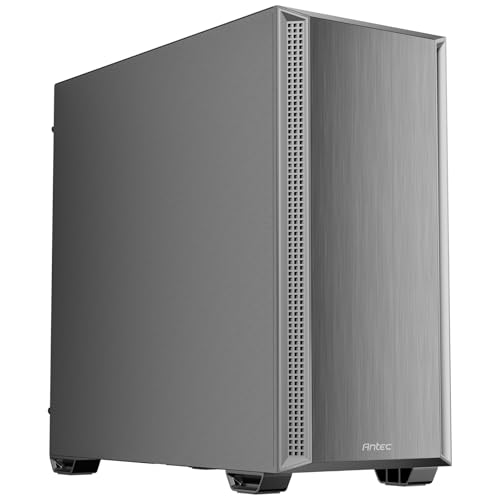
Builders seeking a blend of natural interior aesthetics and subdued acoustics will appreciate the Fractal Design North Charcoal Black Tempered Glass. Its real wood front slats and optimized fan configuration offer smooth ventilation without excessive motor noise. Those who require maximum pre-installed fan cooling at an affordable entry point should also consider the Antec P7 S Mid-Tower ATX PC Case with its four included PWM fans and insulated side panels.
Matching your chassis choice to your specific hardware power consumption ensures long-term computing satisfaction. Take time to configure your fan curves in BIOS after assembly to achieve the quietest possible operation. A well-chosen silent enclosure will outlast multiple internal hardware upgrade cycles while keeping your desk peaceful.
Frequently Asked Questions About Best PC Cases for Silent Builds
Are Best PC Cases for Silent Builds worth it in 2026?
Yes, dedicated silent cases are worth the investment because modern graphics cards and processors draw significant wattage and generate noticeable acoustic turbulence. Sound-dampened enclosures effectively muffle high-frequency coil whine and fan hum that open-mesh cases let escape. They create a significantly calmer work and gaming environment without sacrificing component longevity.
How do 140mm fans help Best PC Cases for Silent Builds stay quiet?
Larger 140mm fans move a higher volume of air at significantly lower rotational speeds compared to standard 120mm fans. Spinning at 600 to 800 RPM allows them to supply adequate cooling airflow while remaining virtually inaudible to human ears. This lower RPM eliminates high-pitched motor whine and reduces air shearing turbulence.
Does sound dampening foam increase internal PC temperatures?
Sound dampening foam acts as a mild thermal insulator, which can raise internal ambient temperatures by two to four degrees Celsius. However, proper intake and exhaust airflow through well-placed fans completely offsets this minor thermal retention. The noise reduction benefits far outweigh the negligible difference in component temperatures.
Which option is the top-rated choice among Best PC Cases for Silent Builds for high-end GPUs?
Cases with generous internal clearances and dedicated lower intake channels provide the best environment for modern power-hungry graphics cards. The be quiet! Silent Base 802 Window ATX Midi Tower PC excels here because it accommodates massive graphics cards while dampening electrical coil whine with thick insulation mats. It also allows vertical GPU mounting to optimize interior space.
Is liquid cooling quieter than air cooling in a soundproof chassis?
Liquid cooling can run quieter during short burst workloads because liquid absorbs heat spikes without requiring immediate fan speed increases. However, liquid coolers introduce pump noise that can create a persistent low-frequency hum if not decoupled properly. High-end air coolers with large heatsinks and low-RPM fans are often simpler and equally quiet for everyday computing.
Can tempered glass panels block noise as effectively as solid steel?
Tempered glass reflects sound waves rather than absorbing them, making it slightly less effective than foam-lined steel panels at eliminating coil whine. Thick tempered glass still blocks airborne sound better than unlined thin metal, but solid insulated panels provide superior acoustic dampening overall. Choosing glass is primarily an aesthetic preference.
How do decoupled drive cages eliminate computer hum?
Decoupled drive bays use soft silicone or rubber grommets to separate spinning mechanical hard drives from the metal chassis frame. This physical isolation prevents motor spin vibrations from transferring into the steel structure and amplifying into an audible room hum. Decoupling is essential for anyone running multi-drive storage arrays.
What fan curve settings produce the quietest operation?
The quietest fan curve keeps intake and exhaust fans locked at a static 500 to 700 RPM until component temperatures cross 65 degrees Celsius. Applying a multi-second ramp delay prevents fans from revving up during brief CPU usage spikes. This smooth profile maintains silent idle acoustics during web browsing and office productivity.
Why do some quiet computer cases include interchangeable top covers?
Interchangeable covers give builders complete control over the trade-off between acoustic insulation and cooling performance. You can install insulated solid covers for whisper-quiet office operation or switch to a high-airflow mesh cover when running demanding workstation software. This versatility makes the case adaptable to future hardware upgrades.
How does back-connect motherboard support improve acoustics?
Back-connect motherboards route all power cables and data lines behind the chassis tray, leaving the main hardware chamber free of cable clutter. Unobstructed interior chambers reduce aerodynamic drag and turbulence as air flows across your components. Less air resistance allows cooling fans to move heat out of the case at lower speeds.








