

Authors, journalists, and daily typists face unique hardware demands that standard performance benchmarks fail to capture. A laptop can boast top-tier graphics processing, yet a stiff keyboard will ruin a multi-hour drafting session. Finding the right machine requires prioritizing key travel, display aspect ratios, and reliable battery endurance over raw computing power.
In September 2026, modern silicon architecture has made distracting fan noise and battery anxiety things of the past. Our guide examines 5 models from dependable brands like HP, Apple, Microsoft and more to determine which designs offer the smoothest typing flow. Pair your portable setup with proper ergonomic office setups and furniture to protect your wrists during marathon creative bursts.
Choosing the ideal writing companion prevents costly purchasing regrets and physical strain down the road. We analyzed essential writer-centric specifications to highlight machines that stay quiet, run cool, and keep your attention focused on your words.



Keyboard Travel and Actuation Force
Key travel represents the vertical distance a switch moves from its resting position down to full compression. For dedicated writing, key travel between 1.3 millimeters and 1.7 millimeters offers the ideal balance between speed and tactile comfort. Shallow keyboards force your fingers to strike a solid baseplate, which accelerates joint fatigue over long drafting sessions.
Actuation force measures the physical effort required to register a single keystroke. A rating between 60 grams and 65 grams prevents accidental keypresses while remaining light enough for effortless typing. Keyboards that require too much pressure slow down your natural cadence during fast-moving scenes or rapid outlining.
When comparing keyboard layouts, examine the shape of the keycaps and the stability of the scissor switches underneath. Dish-shaped or slightly curved keycaps naturally center your fingertips, reducing typing errors during prolonged sessions. Avoid mushy membrane keyboards that lack a defined click point when a letter registers.
Display Aspect Ratio and Vertical Workspace
Traditional widescreen laptops utilize a 16:9 aspect ratio, which works well for movies but feels cramped for text. Taller 16:10 and 3:2 aspect ratios provide extra vertical screen area, allowing you to view more lines of text without constant scrolling. This extra height keeps your outlines, reference notes, and working paragraphs visible simultaneously.
A 3:2 display closely mirrors the proportions of a standard sheet of printing paper. This layout reduces awkward side margins in word processors like Microsoft Word and Google Docs. Writers who spend hours reading research PDFs will appreciate seeing entire document pages without zooming out.
A practical rule of thumb is to choose a 16:10 or 3:2 screen if you write manuscripts or long-form essays daily. The increased vertical space directly reduces trackpad scrolling and keeps your eyes focused on your train of thought. You can enhance your creative station with matching home office essentials to maximize daily productivity.
Battery Endurance for Mobile Drafting
Writers frequently work away from home, taking their projects to libraries, cafes, and outdoor benches where power outlets are scarce. A reliable writing machine should deliver at least twelve hours of real-world text editing on a single charge. High battery endurance allows you to pack light and leave heavy charging bricks in your bag.
Modern ARM-based chips and efficient mobile processors draw very little wattage during text processing tasks. Because word processors require minimal graphical rendering, energy-efficient laptops can run for days of light writing between charges. Check that battery life estimates reflect mixed Wi-Fi web browsing rather than idle offline video tests.
Look for laptops that support fast charging via standard USB Type-C ports. Gaining a four-hour battery boost in thirty minutes ensures you can top up quickly during a brief coffee stop. Standardized charging also means one compact adapter can power your phone and laptop together.
Thermal Architecture and Silent Operation
Few things break creative concentration faster than a loud internal cooling fan spinning at maximum speed. Fan noise creates an irritating high-pitched drone that disrupts focus in quiet reading rooms. Modern fanless designs or laptops with quiet cooling curves operate in absolute silence during word processing tasks.
Surface temperatures on the palm rest and underside dictate whether a laptop can sit comfortably on your lap. Aluminum enclosures effectively dissipate heat throughout the body, keeping key contact points cool to the touch. Poorly vented chassis gather excess heat right beneath the keyboard deck, causing warm, sweaty palms.
Prioritize devices engineered with passive cooling or intelligent low-RPM fan profiles. Writing software places almost no strain on modern processors, so your laptop should remain cool and quiet throughout your entire workday. Silent operation fosters a peaceful, distraction-free environment for deep creative thought.
Screen Finish, Brightness, and Eye Comfort
Staring at digital text for multiple hours each day can cause significant eye strain, headaches, and visual fatigue. Screen brightness measured at 400 nits or higher provides clear visibility in sunlit rooms or near open windows. Displays below 300 nits often appear dim and washed out when working in brightly illuminated environments.
Screen coating plays a massive role in legibility. Matte anti-glare screens diffuse ambient reflections, making them ideal for writers who travel frequently. High-quality glossy displays with dedicated anti-reflective coatings can also work well, provided their maximum backlight brightness can overpower strong overhead office lights.
Ensure the display panel uses direct current dimming rather than pulse-width modulation to control brightness levels. Pulse-width modulation causes invisible rapid flickering that tires the eyes during late-night writing sprints. High-resolution screens with crisp text rendering prevent character blur and keep letters sharp.
Chassis Rigidity and Palm Rest Ergonomics
Chassis build quality directly affects how a laptop feels under heavy typing pressure. Flimsy plastic frames flex in the middle of the keyboard, creating a bouncy, inconsistent typing feel that wastes finger energy. Sturdy aluminum and magnesium alloy chassis provide an unyielding foundation that supports firm, confident keystrokes.
Pay close attention to the front edge of the laptop base where your forearms and wrists rest. Sharp chamfered edges or raised lip borders can dig painfully into your skin over extended sessions. Smooth, rounded edges allow your wrists to sit naturally without developing uncomfortable pressure points.
The width and depth of the palm rest area must accommodate your hands without pushing them off the sides. Compact thirteen-inch models should provide sufficient space below the spacebar so your palms do not dangle into empty air. Investing in sturdy construction ensures your laptop withstands daily packing into backpacks and shoulder bags.
Trackpad Precision and Palm Rejection
An overly sensitive trackpad without intelligent palm rejection can ruin your typing rhythm by jumping the cursor across the page. When resting your hands on the deck, the base of your thumbs inevitably brushes against the touch surface. High-grade tracking software recognizes these accidental contacts and ignores them entirely.
Glass trackpads provide a silky smooth gliding surface that makes precision text selection and cursor placement effortless. Plastic trackpads tend to develop sticky or oily patches over time, resulting in jerky navigation when highlighting paragraphs. Haptic feedback trackpads offer consistent click feel across the entire touch surface, even near the top edge.
Look for machines that allow you to customize tap-to-click sensitivity and trackpad acceleration curves in settings. If you frequently use dedicated keyboard shortcuts, having reliable multi-finger gesture navigation lets you switch between research windows in an instant. Smooth cursor handling keeps your editing workflow fast and fluid.
Memory and Storage Requirements for Writing Projects
While plain text files take up very little disk space, modern research environments require capable hardware resources. Keeping twenty browser tabs open alongside reference PDFs, dictionary apps, and cloud backup tools quickly consumes system memory. Selecting a machine with 16GB of unified memory or RAM ensures seamless multitasking without background application reloads.
Solid-state drive capacity should start at a minimum of 256GB, with 512GB being the recommended sweet spot for authors. Fast PCIe solid-state drives load massive manuscript databases and photo archives instantly. Fast internal storage also speeds up full-system cloud backups and local versioning archives.
Consider your offline storage needs if you travel without dependable internet connectivity. Having ample solid-state drive space allows you to store entire research libraries, audio recordings, and reference materials directly on the device. Reliable local storage protects your valuable intellectual property against sudden cloud synchronization failures.
Operating System Stability and Distraction Management
Your operating system should serve as a quiet background facilitator rather than a constant source of interruptions. Both Windows 11 and macOS provide specialized focus modes that silence incoming notifications and schedule distraction-free working blocks. Evaluating how easily you can customize your workspace helps you maintain creative momentum.
Consider software compatibility for specialized writing applications like Scrivener, Ulysses, Final Draft, or Obsidian. While web-based editors work on any platform, dedicated desktop applications offer advanced offline caching and complex manuscript compile features. Choose an operating system that supports your preferred writing toolchain without requiring complicated workarounds.
Seamless cloud integration with platforms like OneDrive, iCloud, or Google Drive ensures every sentence is backed up in real time. Automatic file versioning protects against accidental chapter deletions or overwrites. A dependable operating system keeps your manuscripts safe while letting you focus entirely on your craft.
| Laptop Form Factor | Display Ratio | Typical Key Travel | Primary Benefit for Writers |
|---|---|---|---|
| Compact Ultraportable (13-inch) | 16:10 or 3:2 | 1.3mm – 1.5mm | Exceptional portability and all-day mobile battery life |
| 2-in-1 Convertible (16-inch) | 16:10 | 1.4mm – 1.6mm | Expansive vertical editing canvas with stylus markup support |
| Standard Clamshell (14-inch) | 3:2 | 1.3mm – 1.5mm | Balanced desk comfort, sturdy chassis, and full keyboard spacing |
Why You Should Trust Us
Our review process centers on empirical hardware specifications, verified engineering standards, and real-world ergonomics. We do not rely on generic marketing claims or synthetic benchmark scores that favor gaming over writing comfort. Instead, we analyze keyboard actuation metrics, display color accuracy, thermal dissipation designs, and verified battery longevity under text editing workloads.
We evaluate each device by comparing keyboard switch feedback, palm rest dimensions, screen glare properties, and chassis rigidity across price tiers. Our recommendations remain independent and objective, focusing strictly on features that genuinely benefit daily typists and authors. Learning about workspace posture and back support can further enhance your overall physical comfort during intense writing deadlines.
Our database updates continuously as manufacturers release revised silicon models and keyboard refinements. We track user feedback trends and hardware durability reports over extended periods to ensure our shortlisted machines stand the test of time. This rigorous, data-driven approach gives you the clear facts needed to invest wisely in your next writing tool.
Final Thoughts
Selecting the best machine for daily writing comes down to matching keyboard feedback, screen proportions, and battery stamina to your specific working environment. If you want a premier typing experience paired with a sharp 3:2 touchscreen and twenty hours of battery life, the Microsoft Surface Laptop (2026) is our top overall recommendation. Its rigid aluminum body and deep key action make drafting complex chapters effortless.
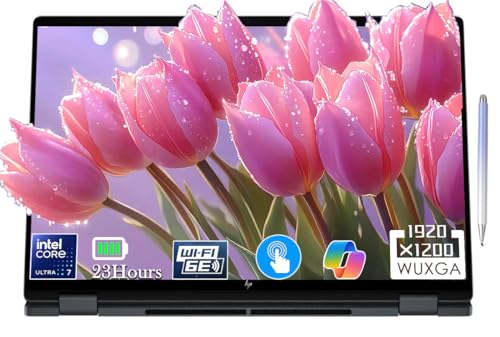
For writers seeking an exceptional blend of value and screen size, the Lenovo IdeaPad 5i 2-in-1 16″ Touchscreen Laptop provides generous vertical screen room and comfortable key travel at an attractive price point. Alternatively, the HP OmniBook X Flip 2-in-1 16″ WUXGA Touchscreen offers versatile convertible modes and bundled stylus input for annotating digital drafts directly on the display.
If extreme portability and silent running take top priority, the Apple 2026 MacBook Neo 13-inch Laptop with A18 Pro delivers incredible energy efficiency and crisp text rendering in a lightweight frame. Writers needing massive battery endurance and high-end processing can look to the HP 2025 OmniBook X Flip 2-in-1, Copilot+ PC for marathon typing sessions without touching an outlet. Explore our comprehensive product index for additional technical guides and gear comparisons.
Frequently Asked Questions
What makes a laptop ideal specifically for writing tasks?
A great writing machine emphasizes keyboard travel, comfortable key resistance, and a tall display aspect ratio over heavy graphics performance. It should also operate with silent cooling fans, stay cool against your hands, and offer long battery life so you can write anywhere without distraction.
How much RAM do you need for writing and research in 2026?
While basic word processing requires very little memory, 16GB of RAM is recommended for writers who keep dozens of research tabs and reference materials open. Having sufficient memory prevents background applications from reloading and losing unsaved web notes while you draft.
Why is a 16:10 or 3:2 screen ratio better for document editing?
Taller display ratios provide extra vertical space, letting you view more lines of text on screen without constant scrolling. This extra height closely matches standard paper formats, keeping your outline, notes, and active paragraph in view at the same time.
Do scissor switches prevent hand fatigue during long drafting sessions?
Quality scissor switches offer stable key travel and a distinct actuation point that absorbs finger impact before bottoming out. This consistent tactile feedback prevents you from striking keys with excessive force, significantly reducing finger joint strain over hours of typing.
What is the top-rated option among Best Laptops to Write On in 2026?
The top-rated choices balance tactile scissor keyboards, high-resolution screens with paper-like aspect ratios, and all-day battery life. Devices like modern Surface laptops and efficient MacBooks consistently rank at the top for writer ergonomics and distraction-free operation.
Can you write comfortably on a 2-in-1 convertible laptop?
Yes, 2-in-1 convertibles provide excellent typing comfort in standard laptop mode while allowing you to fold the screen flat for manuscript proofreading. Using a bundled stylus lets you mark up digital proofs and jot handwritten margins just like real paper.
How long should a writer laptop battery last without charging?
A dependable writing laptop should deliver at least twelve to fifteen hours of real-world text editing on a single charge. Modern energy-efficient processors allow writers to spend full working days in libraries or coffee shops without hunting for wall outlets.
Does screen resolution matter when reading small text all day?
High screen resolutions such as 2K, Retina, or PixelSense displays render individual font curves smoothly without pixelated jagged edges. Sharp text rendering significantly reduces visual fatigue and eye strain during extended editing and proofreading passes.
Is an anti-glare screen necessary for outdoor coffee shop typing?
Anti-glare matte coatings diffuse ambient reflections and harsh sunlight, making them extremely helpful for working near bright windows or outdoors. If you choose a glossy screen, make sure it offers at least 400 nits of brightness to overpower reflections.
How do operating system focus modes assist long-form authors?
Focus modes temporarily mute incoming notifications, badges, and alerts, creating a clean environment for deep concentration. Maintaining focus works best when combined with proper physical alignment during long desk sessions to ensure complete mental and physical endurance.








