Managing an expanding ecosystem of connected gadgets often leads to fragmented apps, delayed schedules, and dropped connections. Upgrading to one of the Best Smart Home Hubs under $200 resolves these headaches by unifying your devices onto a single responsive management layer. Modern platforms now offer seamless cross-brand coordination without demanding subscription fees or complicated networking setups.
The home automation landscape has shifted dramatically with widespread adoption of Matter standards and multi-radio hardware. Many homeowners make the mistake of buying single-protocol bridges that quickly become obsolete as their device collections grow. Our guide compares 4 standout models for September 2026, helping you pick hardware that keeps routines running smoothly even during internet outages.
Whether you want to build automated climate schedules alongside smart thermostats that work with Alexa or consolidate your security sensors, choosing the right controller is essential. Leading selections from AEOTEC, Amazon, Aqara and more provide robust radios, local edge execution, and broad platform compatibility. Exploring the right features today ensures your smart home remains fast, stable, and expandable for years to come.



Wireless Protocol Support and Multi-Radio Diversity
A smart home controller functions as a translator between wireless languages that standard Wi-Fi routers cannot understand. Look for controllers equipped with dedicated radios for Zigbee, Z-Wave, Thread, and Bluetooth Low Energy alongside standard Wi-Fi. Having multiple dedicated transceivers ensures that you can pair low-power battery sensors without needing separate proprietary bridges for every brand.
Evaluating radio specs requires checking supported protocol generations rather than just reading marketing badges. Z-Wave Plus V2 offers greater wireless range and enhanced S2 security compared to older versions, while Zigbee 3.0 ensures broad peripheral compatibility. Thread support is equally critical because it enables direct device-to-device mesh communication without relying on vendor-locked cloud servers.
A sensible rule of thumb is to choose a controller that supports at least two low-power mesh protocols natively. If your existing setup already includes legacy sensors or smart door locks, verify frequency compatibility before purchasing. Investing in multi-radio hardware eliminates clutter around your router and gives you the freedom to buy budget peripherals from any manufacturer.
Matter Controller and Bridge Capabilities
Matter represents the universal communication standard that allows devices across Apple Home, Google Home, SmartThings, and Alexa to interact seamlessly. A hub serving as a Matter Controller coordinates your entire local network and translates commands across platforms. In contrast, a Matter Bridge exposes existing sub-devices, like older Zigbee sensors, to any compatible Matter ecosystem.
When inspecting product specifications, verify whether the hub acts as a full controller, a Thread Border Router, or merely a basic bridge. Thread Border Routers connect your low-power Thread mesh directly to your home network, keeping communication pathways rapid and reliable. Hubs with complete Matter integration allow you to create automations inside your preferred platform while linking sensors from other ecosystems.
Do not assume every Matter-labeled device provides bidirectional translation across all smart gear. Some hubs only expose their own proprietary sub-devices to third-party apps while refusing to adopt external accessories into their primary logic engine. Prioritize controllers that explicitly provide open Matter bridging so your installation remains future-proof as new device categories launch.
Local Edge Processing and Automation Reliability
Cloud-dependent smart hubs send sensor triggers to remote data centers before executing an action like turning on a light bulb. This round-trip process introduces noticeable lag and causes automations to fail entirely whenever your broadband provider suffers an outage. Edge processing solves this issue by storing automation rules and running device schedules directly on local hub hardware.
To evaluate local automation support, examine how the software processes triggers between different protocols. A quality hub executes contact sensor triggers and lighting adjustments on the local chip in under twenty milliseconds. You can verify local processing by reviewing developer documentation or checking whether routines function when disconnecting the hub from active internet service.
As a practical benchmark, prioritize hubs that guarantee local rule execution for everyday lighting, motion tracking, and climate routines. If you maintain seasonal heating or prepare cooling systems alongside window air conditioner covers for winter, local processing ensures schedules never miss a cycle. Reliable local computing keeps your home comfortable, functional, and responsive under all network conditions.
Hardware Processing Power and System Memory
Running multi-threaded routines, complex conditional logic, and device encryption demands adequate computing hardware inside the hub chassis. Controllers featuring quad-core processors and modern memory architectures handle high message volumes without bottlenecking or crashing. Underpowered chips cause delayed responses when multiple sensors detect activity simultaneously during morning or evening peak hours.
Check the processor clock speed and onboard RAM capacity when reviewing technical hardware sheets. Processors clocked at 1.5 GHz or higher paired with multiple gigabytes of DDR memory easily handle hundreds of concurrent device states. Ample flash storage is also essential for maintaining detailed event logs, room backups, and machine-learning presence routines directly on the device.
Calculate your automation complexity to determine required hardware strength before setting up your system. If you plan to run dozens of conditional rules with continuous sensor polling, avoid entry-level chips with limited memory headroom. Choosing robust hardware ensures smooth firmware updates and prevents the sluggish performance that plagues heavily loaded basic controllers.
Maximum Device Capacity and Network Mesh Scaling
Every smart home hub has architectural limits on how many end-devices and routing nodes it can actively manage. Small starter setups rarely exceed twenty gadgets, but whole-home installations quickly scale past one hundred connected components. Exceeding a controller memory threshold leads to dropped packets, unresponsive switches, and frustrating network instability.
Compare both direct child device limits and overall mesh capacity when examining manufacturer specifications. High-end hubs support direct pairing of dozens of battery sensors while accommodating hundreds of routing devices like smart plugs and in-wall switches. Thread and Zigbee protocols rely on mains-powered repeaters to distribute network traffic, requiring a hub capable of maintaining expansive routing tables.
A reliable sizing formula is to select a hub rated for at least double your current device count. If you currently operate thirty smart accessories, choose a controller capable of handling at least one hundred nodes. This buffer prevents unexpected network congestion as you add smart bulbs, environmental monitors, and motorized window shades across additional rooms.
| Feature Spec | Entry Smart Hub | Advanced Multi-Protocol Hub | Smart Display Hub |
|---|---|---|---|
| Primary Wireless Radios | Zigbee, Wi-Fi | Zigbee, Thread, Z-Wave, BLE | Zigbee, Thread, Wi-Fi, BLE |
| Automation Engine | Cloud or Basic Local | Full Local Edge Logic | Hybrid Cloud and Local |
| Device Capacity | 50 to 60 Accessories | 120 to 200+ Accessories | 100+ Compatible Devices |
| Physical Controls | App and Voice Only | App, Web, and Automation | 8-inch Interactive Touchscreen |
| Power Flexibility | USB Power Adapter | Power over Ethernet or USB | In-Wall Adapter or Standard Plug |
Physical Interface and Dedicated Dashboard Controls
Smart home management typically occurs via smartphone apps or hands-free voice commands across living spaces. However, headless bridges tucked inside network cabinets lack immediate visual feedback for visiting guests or family members. Dedicated wall-mounted touchscreens provide instant tactical access to whole-house security, lighting scenes, and streaming camera feeds without unlocking personal phones.
Compare the utility of headless controllers against smart display panels based on where you place your primary controls. Touch panels mounted near entryways or common hallways allow quick adjustments to whole-house scenes with a single tap. Meanwhile, headless units excel at discreet utility placement near your main network switchboard where cabling remains completely hidden.
Consider household user preferences before deciding between a screenless gateway and an interactive display controller. If multiple family members prefer tactile buttons and visual camera widgets, an integrated screen hub streamlines daily management. If you prefer building automated background routines that run invisibly, a dedicated headless gateway provides better placement flexibility.
Wired Ethernet vs Dual-Band Wi-Fi Connectivity
The stability of your smart home backbone depends heavily on how the hub connects to your local area network. Wireless connections provide setup flexibility but remain vulnerable to radio frequency interference from neighboring routers. Hardwired Ethernet ports deliver consistent data throughput, lowest latency, and immune protection against wireless congestion.
Look for controllers that support dual-band Wi-Fi along with dedicated RJ-45 Ethernet connections for maximum deployment versatility. Advanced models supporting Power over Ethernet allow you to transmit both power and data across a single Cat6 cable. This feature eliminates messy power cords and allows clean wall or ceiling installations far away from electrical wall outlets.
Whenever practical, connect your primary smart home controller directly to your router or managed network switch via Ethernet. If hardwiring is impossible due to building layout, position your wireless hub within clear line-of-sight of your access point. Avoiding thick concrete walls and metal enclosures ensures steady signal transmission for all bridging functions.
Data Privacy, Local Storage, and Security Encryption
Smart hubs collect sensitive behavioral data, including occupancy habits, lock activity logs, and camera event feeds. Selecting a controller with strong on-device encryption prevents unauthorized actors on your network from intercepting personal information. Privacy-focused hardware avoids unnecessary microphones or biometric cameras unless specifically requested for interactive voice control.
Examine the encryption protocols implemented for local storage and wireless sensor communications across the system. Look for WPA3 wireless security support, Zigbee Trust Center safeguards, and end-to-end encrypted flash partitions for local configuration files. Controllers that avoid mandatory account cloud synchronization keep your operational records private and secure from external data breaches.
A smart privacy rule is to verify whether basic automation and device pairing require continuous cloud sign-in. Favor platforms that allow local account configuration and offer physical microphone mute switches on display-equipped models. Protecting your data at the hardware level ensures peace of mind while enjoying the conveniences of a connected residence.
Specialized Subsystem Integration and Legacy Control
Many households contain traditional appliances that lack native wireless connectivity, such as older air conditioners or audiovisual equipment. Advanced controllers bridge this gap by including built-in infrared blasters with learning capabilities directly on the chassis. This functionality transforms dumb appliances into responsive smart home endpoints without requiring external third-party smart plugs.
Evaluate whether a prospective controller offers unique sensory abilities like spatial motion detection or ambient environmental monitoring. Some specialized lighting hubs utilize multi-device wireless disturbance sensing to track room occupancy without requiring dedicated standalone hardware. These built-in hardware extras provide significant value by cutting down on the total number of individual sensors you must purchase.
Identify existing non-smart hardware in your rooms before finalizing your purchase to see if integrated blasters solve a problem. Pairing an onboard infrared transmitter with wireless temperature sensors allows complete climate automation for standard ductless heating and cooling units. Choosing a controller with rich hardware integrations simplifies your setup and maximizes overall system utility.
Why You Should Trust Us
Our evaluation framework focuses strictly on objective technical specifications, verified communication protocols, and architectural reliability. We analyze radio hardware capabilities, edge computing performance, memory capacities, and cross-platform compatibility across major smart home standards. By benchmarking hardware against published engineering data, we eliminate manufacturer marketing bias from our comparative assessments.
We continuously monitor developer updates, protocol certification records, and firmware enhancements to ensure our guides reflect modern capabilities. Each controller is scrutinized for local execution integrity, ecosystem bridges, and security compliance before inclusion. Our recommendations prioritize long-term stability and value, providing readers with transparent data to build dependable home automation systems.
Final Thoughts
Selecting the right smart controller depends on whether you prioritize multi-protocol flexibility, dedicated touch controls, or specialized lighting management. For general smart home builders seeking exceptional versatility and robust local edge automation, the Aqara Smart Home Hub M3 for Advanced Automation represents our best overall recommendation. Its combination of Thread, Zigbee, Matter bridging, and Power over Ethernet capabilities delivers an uncompromising automation foundation.
If your smart home relies heavily on Z-Wave devices alongside standard Zigbee accessories, the Aeotec Smart Home Hub, Works as a SmartThings Hub stands out as our top value pick. It bridges thousands of third-party products effortlessly while offering mature automation tools via SmartThings. Its broad radio selection makes it an accessible centerpiece for multi-brand smart households.
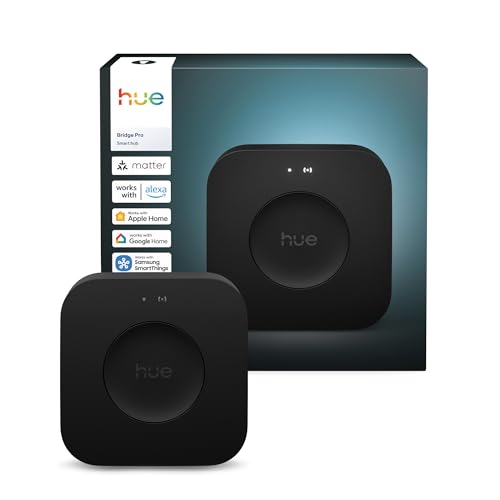
For dedicated wall-mounted control and seamless Alexa integration, the Amazon Echo Hub (newest model), 8″ provides an intuitive touchscreen dashboard that simplifies daily family access. Alternatively, lighting enthusiasts requiring lightning-fast response times and advanced scene capacity will appreciate the high-performance hardware of the Philips Hue Bridge Pro Smart Lighting Hub, 1-Pack. Review our companion guide to smart thermostats that work with Alexa to expand your connected setup with matching hardware.
Frequently Asked Questions
What makes the Best Smart Home Hubs under $200 stand out in 2026?
Controllers in this price segment now deliver features once reserved for commercial automation hardware. You get native multi-radio compatibility, complete Matter bridge support, and local edge processing without monthly subscription fees. These improvements ensure instant response times, higher device capacities, and dependable reliability across diverse smart accessory brands.
Do I need a smart home hub if all my devices use Wi-Fi?
Wi-Fi devices connect directly to your router, but having dozens of individual smart items can congest your wireless bandwidth. A dedicated hub allows you to use low-power Zigbee and Thread accessories that build their own self-healing mesh networks. Hubs also coordinate complex multi-device routines locally without bogging down your home broadband connection.
How does Matter protocol support change smart home hubs in 2026?
Matter creates a universal language that allows certified accessories to communicate locally across Apple Home, Google Home, SmartThings, and Alexa simultaneously. Modern hubs equipped with Matter bridging expose legacy sensors to any ecosystem you prefer. This universal compatibility prevents platform lock-in and lets you build custom routines across previously incompatible brands.
What is the difference between Zigbee and Thread on modern hubs?
While both protocols operate low-power mesh networks on the 2.4 GHz spectrum, Thread integrates directly with IP-based network architectures. Zigbee requires a specialized gateway translator to talk to your home network, whereas Thread devices use native IPv6 routing. Modern hubs often include transceivers for both standards to maximize peripheral compatibility.
Why is local automation execution important for connected homes?
Local execution processes automation logic directly on the hub hardware rather than sending commands to external internet servers. This drastically reduces response latency from several seconds down to mere milliseconds for lights and motion triggers. Crucially, your programmed schedules and security routines continue functioning normally even if your home internet connection goes offline.
Can a single hub control devices across Apple, Google, and Alexa platforms?
Yes, hubs with Matter controller and bridging capabilities synchronize connected accessories across multiple smart home ecosystems at the same time. You can trigger an automation using Siri on an iPhone while family members manage the same devices via Google displays or Alexa voice commands. This multi-admin capability removes previous platform barriers completely.
How do I migrate existing devices when upgrading to a new hub?
Many modern smart hubs feature automated software migration tools that transfer Zigbee pairings and scene configurations from older brand bridges. For non-migratable accessories, unpairing the device from the legacy gateway and putting it into pairing mode connects it to the new hub in seconds. Backing up your automation logic before upgrading ensures a smooth transition.
What happens to smart home automations when the internet connection drops?
If your hub supports local edge computing, all locally configured sensor triggers, lighting schedules, and hardware automations continue running without disruption. Only remote notifications, cloud-based voice assistants, and external streaming camera feeds will pause until internet service restores. This fail-safe operation is a primary benefit of dedicated hub hardware.
Does a smart home hub with a touchscreen replace voice assistants?
A touchscreen controller complements rather than replaces voice assistants by providing a visual, tactical management dashboard for common areas. Family members and guests can adjust climate settings or view security feeds without needing voice commands or smartphone access. Most smart screen hubs also include built-in voice microphones for complete hands-free control.
How does Power over Ethernet benefit a centralized hub setup?
Power over Ethernet supplies both electrical operating power and high-speed network communication through a single standard Ethernet cable. This eliminates the need for bulky AC wall adapters and allows flexible placement on walls, ceilings, or structural columns. PoE also lets you power the hub from a centralized uninterruptible power supply for continuous uptime during blackouts.