


iRobot Roomba Max 705 Robot Vacuum with AutoEmpty
As an Amazon Associate we earn from qualifying purchases. Product prices and availability are accurate as of the date/time indicated.
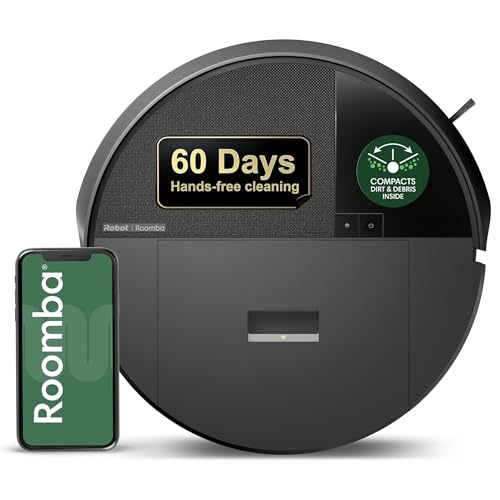
With pet hair and kid crumbs scattering across carpets and hard floors most days, the Roomba Max 705 steps in with dual rubber anti-tangle brushes and 180x more power-lifting suction to handle it all, even boosting on carpets. LiDAR navigation and PrecisionVision AI keep it mapping your home accurately while dodging cords, socks, or pet waste, and the AutoEmpty dock seals away debris for up to 75 days without stirring up dust. After a few runs, floors stay noticeably cleaner with less daily sweeping, though you’ll want to place the dock in an open spot for easy access at first.
Who Is This Product For?
This robot vacuum suits busy professionals juggling long work hours in suburban homes, where floors collect crumbs and dust between rushed mornings. Pet owners with shedding dogs or cats in apartments or houses find it handles daily hair buildup without constant intervention. Parents in family homes deal with kid messes and toys scattered around, needing something that runs on its own during dinner prep. Empty nesters in single-level spaces want low-effort cleaning for occasional dust or visitor tracks. Tech-savvy folks in urban lofts appreciate mapping for efficient runs amid city grit. Common threads include frustration with manual vacuums, tangles from pet items or socks, and time lost to emptying bins.
Key Features & Benefits
Dual Rubber Brushes
These patented brushes flex to maintain contact across carpets and hard floors, paired with strong suction to loosen embedded dirt. In homes with mixed flooring, they prevent skips on transitions, pulling up pet hair or tracked-in grit that sticks vacuums often miss. Expect fewer manual touch-ups near furniture legs after repeated passes.
ClearView Pro LiDAR
The lid scans and maps rooms for full coverage, working in low light and using sensors to avoid stairs. For multi-room homes, it builds an accurate layout over a few runs, reducing random bumping and ensuring edges get cleaned. Users notice paths become more direct after the initial mapping sessions.
PrecisionVision AI
Sensors spot and steer around cords, socks, or pet waste in real time. During unsupervised runs, this cuts interruptions from small obstacles, especially useful in kid-filled living rooms or pet zones where items end up on floors unexpectedly.
AutoEmpty Dock
The dock sucks debris into a sealed bag holding particles down to 0.7 microns, lasting up to 75 days without handling. Apartment dwellers avoid dust clouds from manual dumps, though the bag’s size means planning dock placement away from high-traffic spots.
Dirt Detect Technology
It senses heavier dirt patches and repeats over them for deeper cleaning. In high-traffic kitchens or after meals, this targets crumbs or spills without whole-house reruns, saving battery on lighter areas.
What to Consider When Buying
Think about your home’s layout—multi-level spaces need good stair avoidance, while open plans benefit from mapping speed. Check dock dimensions for corner fit, as it requires clearance. Durability shows in brush flex over months of pet hair use, but anti tangle robot vacuum design means occasional hair clipping. Budget for bag replacements every couple months initially. Common mistakes include ignoring app setup time (first run takes 20-30 minutes), underestimating battery for large homes (recharges mid-job), and expecting silent operation during peak suction modes.
How to Choose the Right One
Start with your main mess type: prioritize dual rubber brushes for pet hair or carpets, suction for hard floors. Measure dock space and review navigation needs—LiDAR for complex layouts, basic for small areas. Use this checklist: Does it handle your floors? Avoid your obstacles? Empty without dust? Match your schedule with battery life? Test return policy for mapping fit. Narrow by recent feedback on real homes like yours.
Why This Is a Smart Choice
Over weeks, floors stay cleaner with less effort, as mapping refines and dirt detection focuses energy. The robot vacuum with AutoEmpty dock cuts weekly chores, letting routines shift to other tasks. Suction tackles stubborn spots reliably, and AI reduces stuck incidents compared to older models. Trade-offs like bag costs balance against time saved, building dependability in daily use.
Care & Maintenance Tips
- Wipe sensors weekly to keep navigation sharp, especially after dusty runs.
- Empty the dock bag every 1-2 months based on home traffic; stock extras for seamless swaps.
- Clip long pet hair from brushes monthly—takes under 5 minutes and prevents slowdowns.
- Place dock in a consistent spot for reliable return; avoid rugs that might shift it.
- Update app seasonally for mapping tweaks, noticing smoother paths afterward.
FAQs
Q: How well does the iRobot Roomba Max 705 handle pet hair on carpets in a home with shedding dogs?
A: The dual rubber anti-tangle brushes and powerful suction with Carpet Boost effectively pick up pet hair from carpets, powering through daily shedding without frequent tangles. In multi-pet homes, it repeats passes over dirtier spots using Advanced Dirt Detect, though edges near baseboards might need occasional manual touch-up after initial runs. Users notice floors staying noticeably cleaner after a week of scheduled cleans.
Q: Will this robot vacuum with LiDAR navigation get stuck on socks or cords scattered around the living room?
A: PrecisionVision AI immediately spots and avoids objects like cords, socks, or pet waste, while ClearView Pro LiDAR maps for efficient paths. It handles cluttered family rooms well during evening runs, but very small items under 1 cm might occasionally require picking up beforehand. Navigation improves over the first few mappings as it learns your layout.
Q: What’s involved in maintaining the AutoEmpty dock on the Roomba Max 705?
A: The dock uses enclosed bags that trap debris down to 0.7 microns, lasting up to 75 days in typical homes before a simple swap. Emptying avoids dust clouds entirely, though you’ll replace bags every couple months depending on household dirt levels. A minor trade-off is checking the dock’s full sensor light weekly at first to get the timing right.
Q: Can the robot vacuum with AutoEmpty dock safely clean a two-story house with stairs?
A: Obstacle and anti-fall sensors keep it from tumbling down stairs, and LiDAR ensures thorough coverage on single floors without constant supervision. For multi-level homes, carry it between floors for separate mapping sessions—it’s lightweight enough for quick moves. It works day or night, fitting busy routines where you just swap levels as needed.
Q: How does it perform on a mix of hard floors and area rugs compared to my old basic Roomba?
A: Dual rubber brushes flex to stay in contact across hard floors and carpets, with 180x more suction in Spot Clean mode versus Roomba 600 series for tougher messes. The edge-sweeping brush reaches closer to baseboards than simpler models, though transition lips over 1 cm high can slow it briefly. Expect more consistent deep cleans on varied surfaces after the initial home mapping.
Q: Setting up the app for scheduling cleans—what’s that like for someone with a busy morning routine?
A: The app connects quickly via Wi-Fi for mapping and scheduling, letting you set daily runs that sync with your routine without much tinkering. LiDAR builds an accurate map on the first go, with options for no-go zones around pet bowls. Over time, it adapts to minor furniture shifts, saving you from daily adjustments.






Write Your Review
No reviews yet. Be the first to share your experience!