

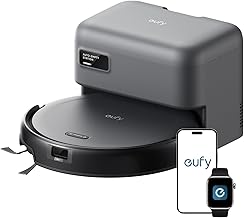
eufy C10 Robot Vacuum Self Emptying
As an Amazon Associate we earn from qualifying purchases. Product prices and availability are accurate as of the date/time indicated.
With pet hair collecting in corners and crumbs under the couch after busy days, the eufy C10 robot vacuum steps in with its self-emptying station that handles up to 8 weeks without a bag change. Its 2.85-inch slim design slips under beds and desks, while the extendable side brush and 4,000 Pa suction tackle those tricky spots effectively, and LiDAR navigation maps out efficient paths for complete coverage. After a few runs, you notice less daily sweeping around, though it pairs best with a 2.4GHz WiFi network for smooth app control.
Who Is This Product For?
This robot vacuum with automatic emptying suits busy parents juggling kid messes and pet hair in suburban homes, where daily crumbs and shedding turn floors into a constant chore. Pet owners in apartments or houses dealing with fur in corners and under furniture find it handles those spots without extra effort. Working professionals with long hours appreciate the scheduled runs for small spaces like condos, while seniors in single-level homes value less bending for dust bin changes. It fits situations with low furniture clearance or tight schedules, easing the routine vacuuming that piles up over the week.
Key Features & Benefits
Self-Emptying Station with 3L Dust Bag
The robot returns to its station after runs and empties its dust bin into a 3L bag that lasts about 60 days before needing a swap. In homes with daily dirt buildup from pets or kids, this cuts out frequent manual emptying, freeing up evenings for other tasks instead of dealing with a full bin mid-week.
4,000 Pa Suction and Rolling Brush
Suction at 4,000 Pa works with a rolling brush to pick up pet hair, dirt, and crumbs, though results depend on floor type and mess amount. On hard floors with scattered kibble or fur balls, it clears paths effectively during quick midday cleans when you’re short on time.
Extendable Side Brush for Corners
An arm extends the side brush to reach into corners and edges, grabbing hair tucked in crevices. This shines in rooms with baseboards or furniture legs where dust hides, reducing the spots you end up hand-vacuuming after the robot’s pass.
Laser Navigation for Path Planning
Laser sensors map the home and plot efficient cleaning routes, supporting app-set zones or schedules. For multi-room setups, it learns layouts over a few runs, avoiding random bumping and covering more ground while you’re out, with paths improving after initial uses.
2.85-Inch Slim Profile
At 2.85 inches tall, it slides under beds, desks, and low sofas that standard vacuums skip. In homes with furniture close to the floor, this reaches dust bunnies in those forgotten areas, noticeable after a month when manual cleaning there drops off.
What to Consider When Buying
Think about your home’s layout, floor types, and how often you’ll interact with it. The station needs space nearby, and app control requires 2.4GHz WiFi—no 5GHz or remote included. Durability holds up for daily use, but bags add ongoing costs.
- Measure under-furniture clearance; 2.85 inches fits most but not all.
- Check WiFi band upfront to avoid setup frustration.
- Common mistake: Overlooking bag replacement timing, leading to surprises every couple months.
- Another pitfall: Expecting perfect carpet performance without testing debris levels first.
- Size the station footprint for your setup—it’s not tiny.
How to Choose the Right One
Start by listing your top needs: pet hair volume, home size, or slim access. Match against suction power for your floors and navigation for room count. Use this checklist: Does it empty itself to match your schedule? Fit under key furniture? Handle corners without extras? Review images for real dimensions, then filter for similar user homes. Test via return policy if mapping or app quirks worry you—prioritize what solves your daily drag.
Why This Is a Smart Choice
Over time, the self-emptying and navigation reduce hands-on time, especially in pet-heavy homes where fur lingers. Users see floors stay cleaner with less effort after the first mapping sessions, and the slim build tackles spots that stay dusty otherwise. It’s practical for routines with travel or kids, trading minor app setup for weeks of steady runs. The corner arm addresses a common leftover mess, making full cleans more routine without perfection.
Care & Maintenance Tips
Keep it running smoothly with routine checks, as small habits build reliability.
- Swap the 3L bag every 60 days or when full—stock extras to avoid pauses.
- Wipe sensors and brushes weekly if pet hair clumps; it prevents skips over time.
- Place station in an open spot for easy docking, noting it pulls back slightly on return.
- Update app for better mapping after initial runs, as paths refine with use.
- Avoid thick rugs at edges; the slim height trades some deep-pile grip for low access.
FAQs
Q: How often do I need to replace the dust bag in the self-empty station?
A: The 3L dust bag in the eufy C10‘s self-empty station lasts about 60 days with regular use in a typical home. Over time, heavier dust loads from pets might shorten this slightly, so checking the fill level via the app helps plan ahead. It’s a set-it-and-forget-it routine that cuts down on weekly chores.
Q: Will this robot vacuum fit under my low bed and desk?
A: At 2.85-inch slim design, the eufy C10 robot vacuum slides under most low-profile furniture like beds and desks, reaching spots that taller models skip. Users in apartments notice it picks up dust bunnies in those tight areas without needing to move things around. Just measure your clearances to confirm.
Q: How well does it handle pet hair in corners and along edges?
A: The unique corner rover arm extends the side brush to get into nooks and crannies, pulling out pet hair that hides there. Combined with 4000 Pa suction, it manages shedding from dogs or cats on hard floors effectively, though brushing off mats beforehand helps on thicker carpets. Daily runs keep floors noticeably cleaner without manual corner chasing.
Q: Can I set it to clean specific rooms or schedules from the app?
A: LiDAR navigation lets the self-emptying robot vacuum map your home and create custom cleaning paths for rooms or zones. Schedule runs while you’re at work or sleeping through the app, which only connects to 2.4GHz WiFi networks. Mapping takes a couple of initial runs to refine for multi-level spots.
Q: Does it adjust suction automatically for carpets?
A: Yes, the carpet detection boosts suction when it hits rugs, working alongside the powerful 4000 Pa pull to lift dirt and hair. It handles transitions in homes with mixed flooring, but very shaggy carpets might need an extra pass. Expect solid results without constant tweaks.
Q: What’s the setup like for the first cleaning run?
A: Unbox, fill the station, and pair via the app over 2.4GHz WiFi—no remote is included, so app control is key from the start. Advanced smart mapping builds your home layout during the first few outings, smoothing out navigation over time. A quick evening setup gets it running hands-free the next day.
Q: How hands-off is the maintenance compared to non-self-emptying vacs?
A: The self-emptying robot vacuum dumps its bin into the station automatically, making it far less frequent to handle dust yourself. Swapping the bag every couple months is the main task, though wiping the sensors occasionally keeps performance steady. It frees up weekends in busy pet households.






Write Your Review
No reviews yet. Be the first to share your experience!