

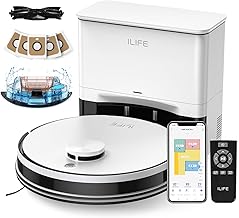
ILIFE A30 Pro Robot Vacuum and Mop
As an Amazon Associate we earn from qualifying purchases. Product prices and availability are accurate as of the date/time indicated.
With kids tracking in dirt and pet hair on both hard floors and carpets, setting up a cleaning routine that actually sticks can feel like a chore. The ILIFE A30 Pro robot vacuum and mop with 5000Pa suction and LiDAR navigation handles vacuuming, mopping, and self-emptying into bags that last up to 8 weeks each—after a few days, you notice floors staying cleaner without the daily dustbin hassle. Use the app for no-go zones and schedules over 2.4GHz WiFi, though mapping the home takes a quick initial run to get spot-on.
Who Is This Product For?
This self-emptying robot vacuum suits busy parents in suburban homes dealing with kid messes and pet hair, who need something that runs on a schedule without daily emptying. Pet owners in apartments or houses with shedding animals find it handles hair on floors without constant intervention. Time-strapped professionals with long hours appreciate the hands-off operation in condos, while empty nesters or seniors in single-family homes value the low-bending setup for occasional cleans. It fits those with mixed carpets and hard floors who want vacuuming and mopping in one pass, especially in cluttered spaces where mapping avoids furniture jams.
Key Features & Benefits
Precision LiDAR Navigation
The laser-based system scans rooms to build maps and plot cleaning paths. In real homes with furniture and toys scattered around, this means fewer missed spots and less bumping into chair legs during runs. It shines in multi-room houses, covering more ground efficiently over repeated uses.
Self-Emptying Station with Long-Lasting Bags
After each cycle, the robot docks to dump debris into large bags that last up to 8 weeks each, with five included for extended hands-free periods. For households with daily dirt buildup, this cuts out weekly trips to the trash, though you’ll eventually replace bags as they fill in dustier environments.
App for Custom Cleaning Control
Through the app, set schedules, block off areas like pet bowls with no-go zones, or pick specific rooms. It works on 2.4GHz WiFi, helping users tweak suction or water flow for spot cleans—useful when prepping for guests but expect a learning curve if your network mixes bands.
5000Pa Suction with Multiple Modes
Four levels from quiet to max pull up dirt, debris, and pet hair from carpets or hard floors via a roller brush. Opt for lower modes during naps or max for deep rug cleans; over time, it maintains pickup on embedded grit without needing constant manual passes.
3-in-1 Vacuum, Sweep, and Mop
The dual 200ml tanks handle dust and water together, mopping while vacuuming to save 30% time on hard floors. Remove the mop pad if skipping wet cleans—practical for quick daily refreshes, though it won’t replace heavy scrubbing on stubborn stains.
What to Consider When Buying
Think about your home layout, floor types, and WiFi setup before choosing. Size-wise, check clearance under low furniture since the robot and station need space. Usability hinges on app reliability, especially with only 2.4GHz support in homes with newer routers. Durability shows in brush wear from pet hair or rugs over months.
- Avoid assuming it fits everywhere—test paths for tight corners where it might skip.
- Don’t overlook bag costs after the initial five; stock up to prevent interruptions.
- Skip if you need 5GHz WiFi or voice control beyond basic scheduling.
How to Choose the Right One
Start by matching suction needs to your floors: 5000Pa works for pet hair and carpets, but quieter modes suit apartments. Check mapping tech like LiDAR for cluttered homes versus basic sensors. Use this checklist: Does your WiFi support 2.4GHz? Need mopping combo or just vacuum? Budget for bags long-term? Prioritize self-emptying if hands-off matters most, and scan recent feedback on navigation in similar spaces. Narrow to models with room selection if zoning is key.
Why This Is a Smart Choice
Over weeks, the mapping gets sharper with each run, adapting to moved chairs or toys without resets. The bag system means fewer dust clouds from manual dumps, easing routines in pet-heavy or kid-filled homes. It balances power for real dirt loads against everyday quiet operation, delivering consistent coverage that builds trust through reliable app tweaks. Users notice floors staying cleaner longer, with less effort as habits form around scheduled cleans.
Care & Maintenance Tips
Empty the station bags every 8 weeks or when full, folding them sealed to avoid spills. Wipe sensors and wheels weekly to prevent navigation slips on dusty floors.
- Replace the roller brush every 6-12 months if pet hair tangles build up.
- Rinse mop pads after use and air-dry to avoid mold in humid spots.
- Update the app periodically for smoother mapping after furniture changes.
- Run a dry cycle monthly to clear water tank residue, extending tank life.
FAQs
Q: How does the self-emptying station work for someone with a busy family schedule?
The ILIFE A30 Pro self-emptying robot vacuum automatically transfers dust and debris into one of the 5×2.5L dust bags after each run, holding enough for up to 8 weeks per bag or 280 days total with all five. This means less trips to the trash during school rush hours or evenings, though you’ll swap a bag every couple months depending on home traffic. Over time, it keeps the routine hands-off even in homes with kids tracking in dirt.
Q: Will this handle pet hair on both hard floors and carpets without constant intervention?
With 5000Pa suction in Max mode plus a roller brush, the robot vacuum and mop picks up pet hair effectively from hard floors to medium-pile carpets, adjustable via four modes like Quiet for lighter daily sheds. Pet owners note it maintains performance after multiple runs, but brushing off the roller occasionally helps in heavy-shed seasons. You can remove the mop holder if focusing just on vacuuming dry messes.
Q: What if my home WiFi is mostly 5GHz—can I still use the app features?
The ILIFE A30 Pro robot vacuum requires a 2.4GHz WiFi network for app connectivity, so you’ll need to enable that band on your router for setup and control. Once connected, the ILIFEClean app lets you set no-go zones around pet beds or kids’ toys and schedule cleans, though switching bands might take a minute during initial pairing. It’s a common tweak for modern routers but ensures reliable mapping and remote checks.
Q: How well does the LiDAR navigation avoid getting stuck in a cluttered living room?
Using LDS laser tech and SLAM algorithm, it creates precise home maps and plans routes around furniture, with no-go zones and virtual walls customizable via app for spots like chair legs or cords. In real cluttered setups, it covers more ground efficiently than basic sensors, though low furniture might need a quick zone adjustment first time. Daily use refines the map for smoother runs.
Q: Can I mop and vacuum at the same time without swapping parts mid-clean?
The 2-in-1 tank holds 200ml dustbin and 200ml water, allowing the robot mop to vacuum and mop simultaneously on hard floors, cutting cleaning time noticeably. Adjust water levels and suction in the app for your floors, and it transitions without pausing. For carpets only, detach the mop holder easily—no water contact there.
Q: What’s the maintenance like for the dust bags and after months of use?
Each 2.5L dust bag lasts up to 8 weeks in average homes, with the self-empty station handling disposal automatically, so you just seal and toss when full. After a few months, check the station’s filter for clogs from finer dust, a quick rinse keeps it going. It suits lower-maintenance routines, though rural dust might fill bags a bit faster.
Q: Does Alexa integration make scheduling easier for voice-controlled homes?
Yes, pair the LiDAR robot vacuum with Alexa for voice commands to start cleans or select rooms, alongside app or remote options. It’s handy for hands-free starts before bed without pulling out your phone. Expect a one-time setup link, and it works reliably once connected to 2.4GHz WiFi.






Write Your Review
No reviews yet. Be the first to share your experience!