

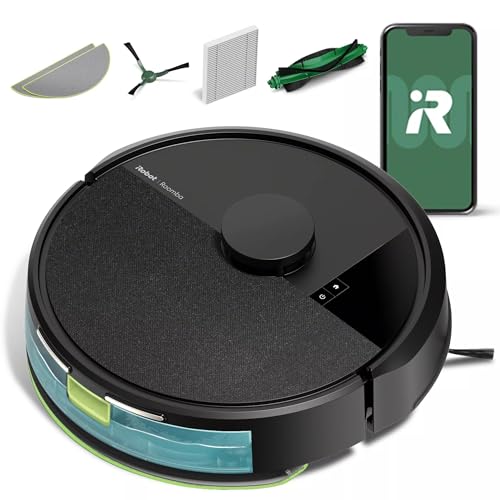
iRobot Roomba 105 Combo Robot Vacuum Mop
As an Amazon Associate we earn from qualifying purchases. Product prices and availability are accurate as of the date/time indicated.
With mixed floors in most homes, mopping often means moving rugs or dealing with wet spots afterward. The Roomba 105 Combo Robot Vacuum and mop handles this by automatically detecting and avoiding carpets, while its LiDAR navigation maps rooms for neat, efficient rows—even in low light. After a few runs, you’ll notice floors staying consistently cleaner with less daily touch-up, though the app setup takes a quick initial pairing. Pick vac-only, mop-only, or combo modes via the easy-to-use Roomba Home App to fit your routine, backed by 70X more power-lifting suction for dirt and the self-charging dock for hands-off use.
Who Is This Product For?
This suits busy parents juggling kids and pets in suburban homes, where floors collect hair and spills daily. It fits professionals in urban lofts with mixed flooring, needing hands-off cleaning during long workdays. Freelancers sharing apartments appreciate it for tackling takeout messes without disrupting routines. Retirees in single-level houses use it for tile maintenance without bending or heavy lifting, especially when mobility limits manual sweeping.
Key Features & Benefits
70X More Power-Lifting Suction with 4-Stage Cleaning
The system pulls up dirt using stronger suction than older models, paired with a multi-surface brush and edge-sweeping brush. In homes with pets or kids, this handles dust bunnies and embedded grit on hard floors and low-pile rugs, reducing the need for pre-sweeping before runs. It shines during weekly deep cleans when floors haven’t been touched in days.
ClearView LiDAR for Mapping and Navigation
LiDAR scans rooms quickly to create maps, dodging furniture and cords while following straight paths, even without lights. For apartment dwellers with cluttered spaces, this means fewer stuck incidents and more complete coverage on first tries, saving time on rescues during evening schedules.
Automatic Carpet Detection While Mopping
It senses rugs and skips them during mop mode, keeping fabrics dry without manual tweaks. Parents with area rugs in family rooms find this practical for combo runs after dinner spills, avoiding wet spots that could lead to slips or extra drying time.
Custom Cleaning via App
Adjust vac-only, mop-only, or combo settings, target rooms, set schedules, and control suction or water levels through the Roomba Home App. Tech users integrate this into routines, like scheduling before work, while checking progress remotely—handy when you’re out and floors need attention mid-day.
Micro-Pump Mop with 2X Deeper Scrubbing
A built-in pump keeps the microfiber mop pad evenly wet with water or solution, enabling a scrubbing mode for tougher spots. In kitchens with sticky residues, this leaves surfaces cleaner after repeated passes, though it works best on sealed hard floors rather than very textured ones.
What to Consider When Buying
Think about your floor types—it’s effective on hard surfaces and low rugs but may need monitoring on thick carpets. App reliance means a stable Wi-Fi setup helps, though basic scheduling works without it. Battery life supports full rooms but recharges automatically for larger homes.
- Space for docking: Needs a clear spot near outlets, about 2 feet clearance.
- Maintenance frequency: Empty bin and rinse pad after every few uses to avoid clogs.
- Common mistakes: Overlooking mixed flooring—test rug avoidance early; buying without extra pads leads to quick shortages; ignoring app updates causes mapping glitches.
- Noise during runs: Noticeable but quiets on mop mode, fine for daytime use.
How to Choose the Right One
Start by listing your floors: mostly hard with rugs? Prioritize carpet detection. Need scheduling? Check app screenshots for room targeting. Compare suction needs—if pet hair dominates, focus on brush design. Use this checklist: Does it map in the dark for your layout? Avoids your rugs reliably? Fits under furniture (about 3.5 inches tall)? Matches your budget after adding pads. Run a short test clean post-setup to confirm navigation in your space.
Why This Is a Smart Choice
Over time, it cuts manual vacuuming to occasional spot-checks, freeing evenings in busy households. The LiDAR navigation robot vacuum builds accurate maps after a few runs, improving efficiency without constant tweaks. Carpet-detecting robot vacuum handles mixed floors realistically, though occasional bin empties remain part of the routine. Users notice floors staying cleaner between full cleans, with gradual buildup of customized schedules fitting daily life.
Care & Maintenance Tips
Small habits keep it running smoothly—expect the mop pad to wear after 20-30 uses, and suction to feel stronger with regular brush cleaning.
- Wipe sensors weekly to maintain navigation accuracy, especially in dusty areas.
- Rinse and air-dry the microfiber mop pad after each use; replace every month for consistent moisture.
- Empty the bin and tap out the filter post-run—pet hair compacts fast if skipped.
- Update the app monthly for better obstacle handling, noticed after dim-light cleans.
- Place on charger after jobs; it resumes automatically but a full charge prevents mid-run pauses.
FAQs
Q: How does the Roomba 105 Combo handle mixed flooring like area rugs during mopping?
A: It automatically detects and avoids carpets while mopping, keeping rugs dry without any manual setup. This works reliably on most area rugs in everyday homes, though thicker pile carpets might occasionally trigger a brief pause before rerouting. Users with pets appreciate this for quick combo cleans after dinner spills.
Q: What cleaning modes can I set up in the Roomba Home App for my daily routine?
A: Choose vac only, mop only, or combo vac-mop, then schedule specific rooms, adjust suction levels, cleaning passes, and mopping solution amount. The app also lets you set keep-out zones for pet bowls or cables. Over time, tweaking these for high-traffic spots like kitchens makes a noticeable difference in floor freshness.
Q: Will the LiDAR navigation work well in a dim apartment at night?
A: Yes, ClearView LiDAR maps your space quickly and navigates in neat rows even in the dark, avoiding common obstacles like shoes or toys. It builds a smart map after the first run, getting more efficient with each clean. Battery returns to the dock automatically when low, though initial mapping takes about 5-10 minutes longer in larger areas.
Q: How effective is the mopping on sticky kitchen floors from cooking?
A: The microfiber mop pad with micro-pump keeps water or solution evenly moist for consistent cleaning, and SmartScrub mode provides 2x deeper scrubbing on tough spots. It leaves tile or hardwood shiny after a pass or two, but for heavy grease, a pre-wipe helps. A small daily clean prevents buildup from turning into bigger messes.
Q: What’s involved in maintaining the power-lifting suction and brushes?
A: Empty the bin after full cleans, rinse the multi-surface brush and edge-sweeping brush weekly, and check the app for filter life alerts. The self-charging robot vacuum design means it docks itself, but accessing brushes requires popping off a couple covers. Regular upkeep keeps suction strong without much hassle.
Q: Can it pick up pet hair as well as older basic Roombas?
A: With 70x more power-lifting suction compared to Roomba 600 series, plus dual brushes, it handles dust bunnies and pet hair effectively on hard floors and low-pile rugs. Expect fewer clogs over multiple runs versus simpler models, though very long hair might wrap brushes occasionally. Families run it daily for that steady hair reduction.
Q: How long does a full clean take in a typical two-bedroom home?
A: Time estimates appear in the Roomba Home App based on your map, usually 45-90 minutes for average spaces depending on mode and passes. It adapts to your floor plan for efficient rows, resuming after recharging if needed. Larger homes benefit from targeting just messy rooms first thing in the morning.






Write Your Review
No reviews yet. Be the first to share your experience!